Fleet Configuration Tools, our bulk configuration app for Wialon, is now released and listed on the Wialon Marketplace. Two tools today: Counter Sync, which sets each unit’s odometer from its own mileage sensor, and Sensor Manager, which renames or deletes a sensor across every unit that carries it.
Unlike the reporting apps in this family, this one writes to Wialon. So every tool reads first and shows the exact units and values it would change, and the write applies that list and nothing else. It is free, and there is no account to create — you sign in with Wialon.
Why bulk configuration is a hole in Wialon
Configuration moves between units through Export to WLP and Import from WLP, and the export options are whole blocks: Counters, Sensors, Eco driving, Custom fields. That is the right tool for setting up a new unit like an existing one.
Changing one property on units that already have their own settings is a different job. A sensor belongs to a unit and is configured in that unit’s own properties — there is no fleet-level sensor to rename once. A naming cleanup across three hundred units is three hundred dialogs, and importing a sensor block over them to avoid that would replace everything else in the block.
Counter Sync: the odometer nobody connected
A common state in a grown account: the unit streams its odometer over CAN, the sensor is configured and reporting, and the mileage counter was never switched to it. It is still on GPS, or GPS + ignition, or off. Nothing errors. The mileage in every report simply drifts away from the vehicle’s real odometer, and the gap only shows up when someone compares a report against the dashboard.
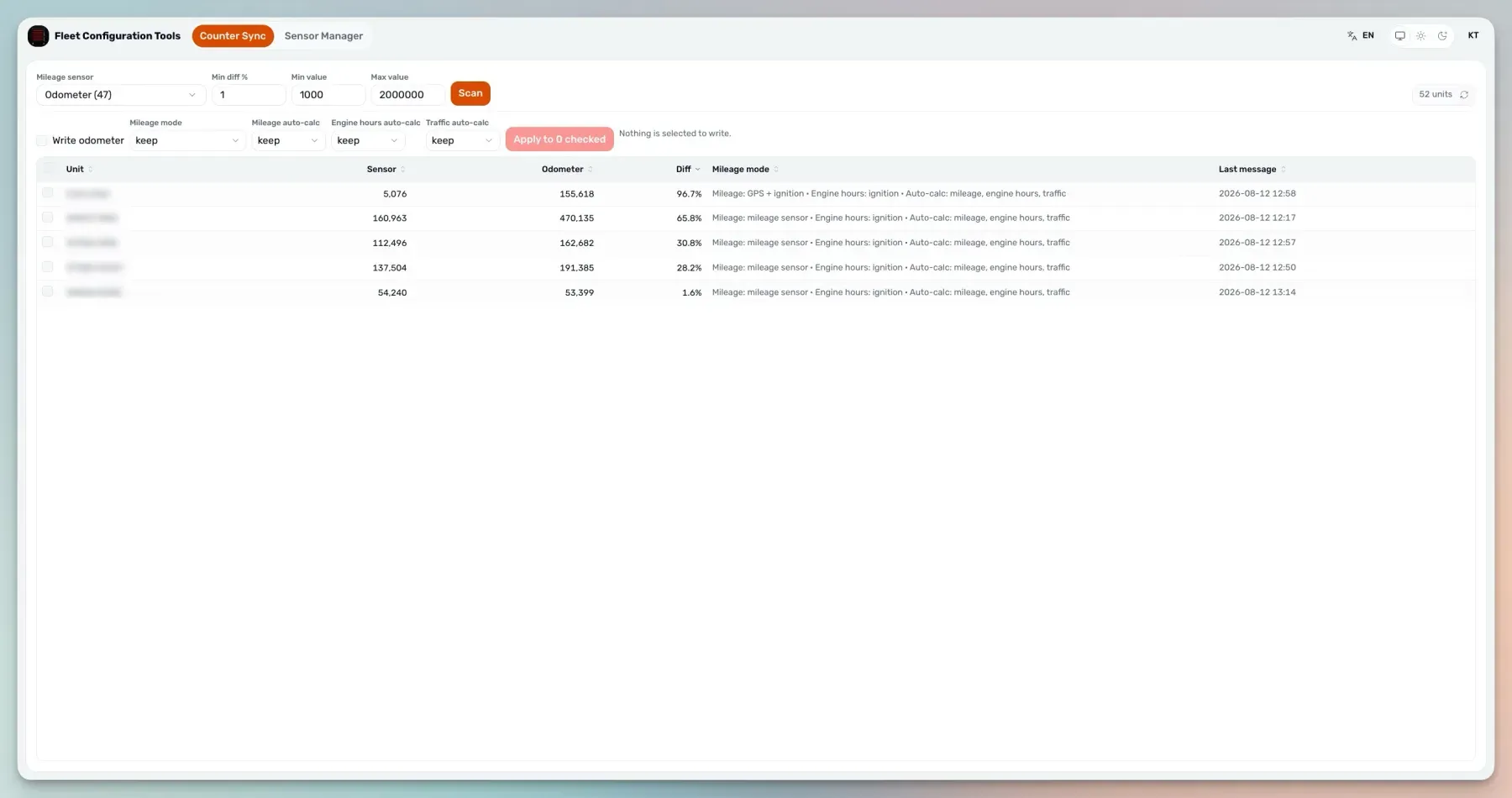
Counter Sync finds those units and closes the gap:
- Pick the mileage sensor by name.
- Filter. A minimum difference in percent between the sensor’s latest value and the counter, plus minimum and maximum value bounds, so you are looking at the units that actually disagree rather than the whole fleet.
- Scan. Every matching unit is listed with its sensor value, its current odometer, the difference between them, its mileage mode and its last message. Scanning only reads.
- Choose what to write. The mileage mode, the odometer value, and the auto-calc bits — mileage, engine hours, traffic — each turned on, turned off, or kept as they are.
- Apply to the units you ticked.
Underneath, unit/update_calc_flags switches the mileage counter to mileage-sensor mode while preserving the engine-hours and auto-calc bits, and unit/update_mileage_counter sets the odometer to the sensor’s latest reading. Per unit, from that unit’s own data.
Sensor Manager: rename across the fleet without flattening the units
The other job is naming. A fleet that grew over years holds the same measurement under three different labels, and every report, every notification and every downstream integration has to know all three.
The obvious fix is to export the sensor names, standardise them in a spreadsheet and import them back. It does not survive contact with a real account: an import replaces the whole sensor block, so every unit that carries a custom validation sensor, its own eco-driving criteria or a custom calculation table for fuel loses them. Those are exactly the units nobody wants to touch, which is why the cleanup never happens.
Sensor Manager changes the name in place instead:
- Pick a sensor name and see every unit carrying it, each row showing that unit’s full configuration for the sensor — sensor id, type, parameter, description, flags, calculation table, validation sensor and validation type, created and modified.
- Rename on the rows you selected. The new name lands on that unit’s own sensor through
unit/update_sensor. Nothing else in the sensor is rewritten, so validators, criteria and calculation tables stay as they are. - Or delete. Useful after importing new settings onto older units, where the new sensors arrived and the superseded ones stayed behind. Wrong, unused and outdated sensors come out of the whole fleet in one action.
Deleting a sensor is permanent in Wialon, so a delete asks for confirmation naming the sensor and the number of units, and an explicit acknowledgement that the sensors are being removed from Wialon for good.
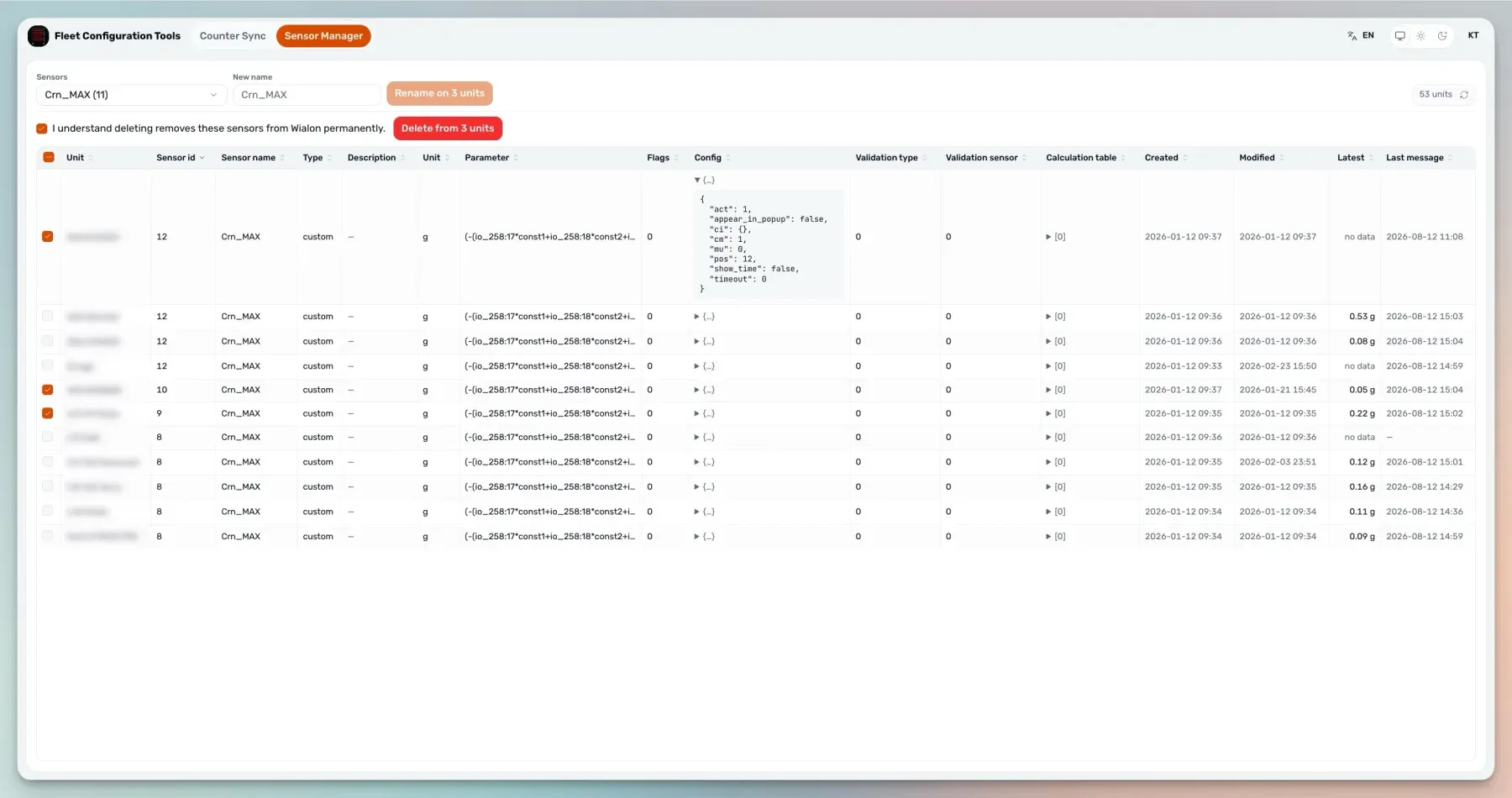
The preview is the instruction
Three things make a fleet-wide write safe enough to click:
- The write carries the preview’s IDs. It sends the exact unit and sensor ids the preview displayed, not a name for the server to resolve again. A sensor created or renamed in Wialon between the preview and the click cannot be caught up in the change.
- One unit’s failure stays with that unit. Changes go through Wialon’s batch call, so a unit Wialon refuses comes back named with its error code and the rest of the run continues. Every run ends with how many succeeded and how many failed.
- The irreversible operation is marked as one. A rename can be reversed by renaming back. A deletion cannot, and the app says so before it happens.
It holds no credential of its own
There is no Fleet Configuration Tools account and no token stored in the deployment. Two ways in:
- Sign in with Wialon — open fleet-cfg.theassettrack.com, choose your Wialon server, and sign in through Wialon’s own login page.
- Register it in the Apps configurator — in Wialon CMS Manager, create an application pointing at the same URL with the advanced URL parameters enabled, and it opens from inside Wialon with the session already established.
Either way the writes happen as you, limited to the rights you have in Wialon, and access is revocable from Wialon at any time. The interface is available in English, Spanish, French, Russian and Swedish.
Built from integrator feedback, and still growing
Neither of these tools came from a roadmap. Counter Sync exists because mileage counters left on the wrong source turned up again and again in real accounts. Sensor Manager exists because a fleet-wide naming standard is easy to agree and, until now, impossible to apply.
That is how the app is meant to grow. If there is a configuration change you are doing unit by unit — a parameter, a custom field, an eco-driving setting, a counter — tell us what it is and how you do it today. Bulk work in Wialon is a long list of small hours, and each tool here removes one of them.
Fleet configuration FAQ
How is this different from Wialon’s export and import?
They do different jobs. Export to WLP copies a source unit’s configuration onto other units, which is what you want when setting up a new unit like an existing one. When one property has to change on units that already have their own settings, copying a whole sensor block over would replace the rest of it. These tools edit the property in place instead.
Can a change be undone?
A rename can be reversed by renaming back. A sensor deletion cannot — it is permanent in Wialon. The preview exists so that decision is made before the write.
What happens if Wialon rejects one unit?
That unit is reported by name with its error code, and the rest of the run continues. A single refusal does not abort or roll back the others.
Do you store our Wialon token?
No. The session belongs to the signed-in user, and the deployment holds no credential of its own, so the app can never do more than the person using it is allowed to do.
Can we run it under our own brand?
Yes, under your brand and your domain, with the commercial relationship yours. Partners often run it internally for onboarding and account cleanup rather than putting it in front of customers.
Getting started
Open fleet-cfg.theassettrack.com and connect with your Wialon account or token. It is free, and it is listed on the Wialon Marketplace.
The full feature breakdown is on the Fleet Configuration Tools product page. If there is a bulk change you are doing one unit at a time, send us a note and we will look at building it.